How to Build AI for Real Estate with APIs and MCP | Leni
How to Build AI for Real Estate with APIs and MCP | Leni
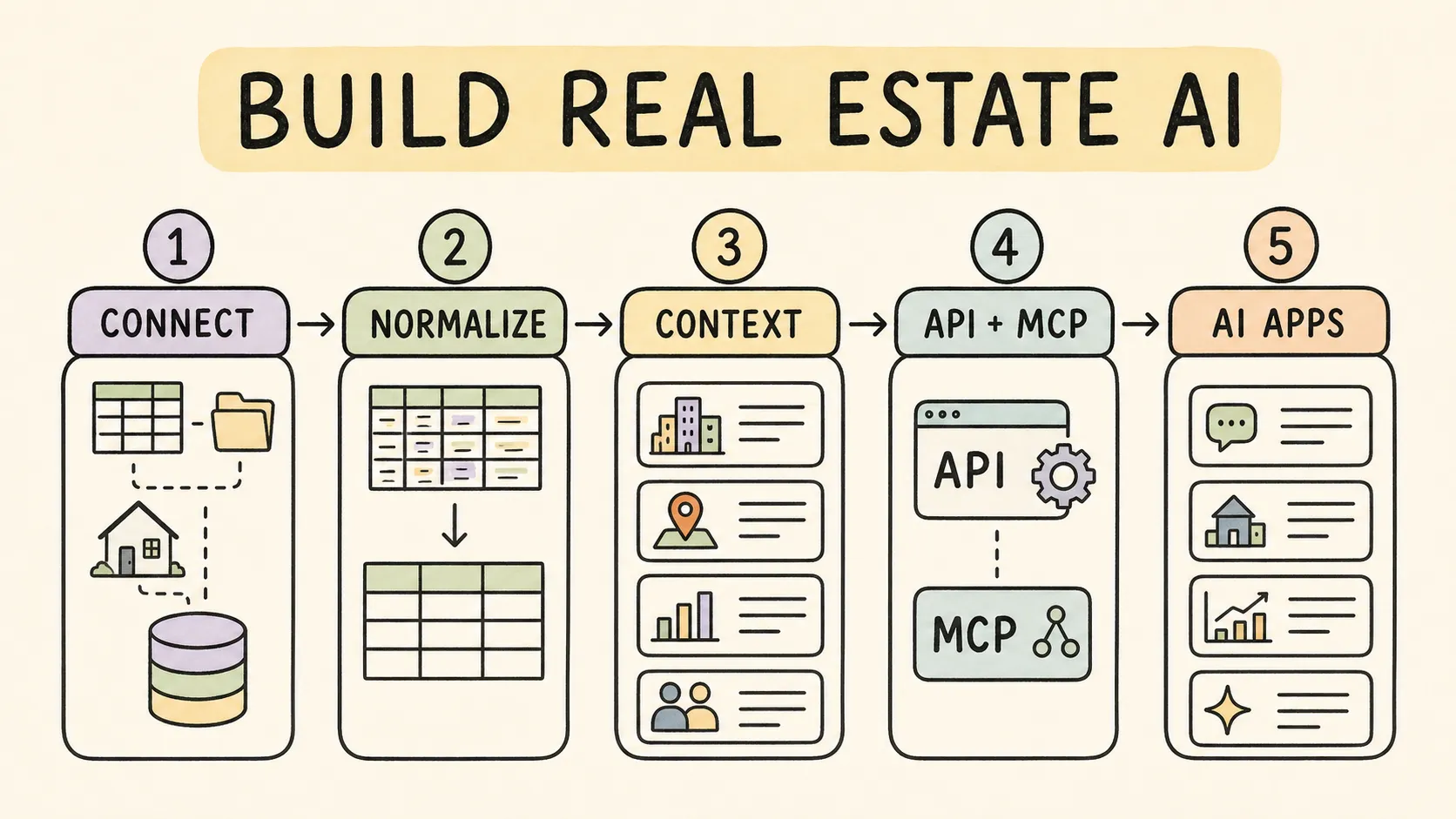
If you’re building AI for real estate, don’t begin with the chat interface. Begin with the work that has to get done: a portfolio review, month-end package, market memo, or variance analysis. Leni provides the governed data, context, runtime, API, and MCP layers that turn a defined job into an approved application or assistant workflow.
Start with the workflow, not the chatbot
A useful real-estate AI product begins with a defined job:
Explain portfolio performance
Prepare a month-end review
Compare actuals with budget
Research a market and assemble evidence
Draft a property or investor update
Answer approved questions using the firm’s data and definitions
Define the deliverable, source evidence, review step, user, and permission boundary before choosing the model or interface.
The minimum production architecture
A dependable implementation usually needs six layers:
Authorized source data from the customer’s approved systems and files
A Universal Data Model that normalizes supported entities and relationships
A semantic layer that defines what the data means
A context layer for relevant personal and organizational knowledge
An intelligent runtime for analysis, tools, memory, and durable execution
A delivery interface through the HTTP API or remote MCP
Leni provides this operating layer for approved real-estate use cases.
Step 1: Define the data and permission scope
List the systems, organizations, properties, data categories, and users the workflow requires.
For each source, confirm:
Customer authorization
Supported connection or ETL method
Read and write direction
Entities and history required
Refresh cadence
Source-of-truth rules
Who can see each organization and property
Do not infer access from a model prompt. Permissions must come from the authenticated Leni account and approved implementation.
Step 2: Map supported data into a governed model
Normalize the supported source data into stable entities and relationships. Add governed definitions for business concepts that can differ across systems or teams.
This is the difference between giving a model a pile of fields and giving it a usable real-estate contract.
Step 3: Choose the delivery path
Use the HTTP API when
You are building a backend, SaaS product, or internal service
The workflow should run server-to-server
You need programmatic session, message, upload, analysis, memory, or custom-analyst operations
Your application can safely store a project API key on the server
Current routes, fields, limits, and response behavior are documented in the Leni developer documentation.
Use remote MCP when
You want a compatible AI assistant to discover and call Leni tools
Each user can authenticate with Leni OAuth
The host supports the current remote MCP connector flow
The workflow should remain inside the user’s authorized organization and property scope
The Leni MCP endpoint is https://mcp.leni.co/mcp.
Step 4: Authenticate correctly
HTTP API: use a project API key for the server-to-server application. Keep it out of browsers, desktop assistants, and public code.
Remote MCP: use Leni OAuth. The user signs in, reviews the active organization and requested permissions, and consents.
Never copy a project API key into an MCP host.
Step 5: Design for durable analysis
Some real-estate work takes longer than a chat response. Leni’s HTTP API can accept an analysis asynchronously and return HTTP 202 with stable identifiers. The client should poll the documented status or result route rather than repeat the original request.
A durable client should:
Save the returned run, message, and session identifiers
Show that the work is still in progress
Poll using the documented contract
Avoid duplicate submissions
Make completed outputs addressable and reviewable
Step 6: Add context deliberately
Use relevant personal and organizational context to align the workflow with the user and firm. Keep the context request bounded to the task.
Treat durable memory as an explicit action. Creating, changing, or deleting memory should happen only when the user asks and the authorization permits it.
Step 7: Build verification into the workflow
A polished answer is not enough for high-stakes real-estate work. Define how the output will be checked:
Are the source records visible?
Do calculations tie out?
Is the reporting period correct?
Is the property scope correct?
Were exceptions surfaced?
Is a human approval required before the result is distributed?
Leni should be positioned as infrastructure that helps execute governed work—not as a promise that every generated output is automatically correct.
Step 8: Respect capability boundaries
Do not design a public workflow around capabilities the runtime does not support.
Money movement or invoice payment
Trading or regulated advice
Mutation of property-management records
Raw SQL passed from an MCP client
Cross-tenant or cross-organization access
Automatic memory of every conversation
Direct connection to every AI host or plan
Example: build a portfolio review assistant
Authenticate the user or server application.
Resolve the approved organization and property scope.
Query supported portfolio data through Leni.
Consult the relevant semantic and organizational context.
Start a durable analysis.
Poll until the result is ready.
Return the narrative, evidence, and exceptions for review.
Save a user preference only if the user explicitly asks.
The exact data model and analysis contract depend on the customer implementation and current API documentation.
Frequently asked questions
What can I build with Leni?
You can build real-estate research, portfolio analysis, reporting support, document workflows, custom copilots, and other AI applications that need governed data and organizational context. Leni supplies the data, tools, permissions, and runtime layer while your team controls the product experience.
What is the fastest way to get started?
Start with one high-value workflow and the smallest approved data scope it needs. We’ll help you choose the API or MCP path, confirm the required permissions and source data, and validate the output before you expand to more properties or use cases.
Should I use the HTTP API or MCP?
Use the HTTP API for your own back end, product, or server-to-server workflow. Use remote MCP when a compatible assistant such as ChatGPT or Claude needs to call Leni tools for a signed-in user. Both paths use the same governed Leni capabilities, but their authentication and user experience are different.
Can I use ChatGPT, Claude, or Gemini?
ChatGPT and Claude can use Leni when the customer’s environment supports a remote MCP connection and the user signs in with Leni OAuth. Leni is model-agnostic, but a direct Gemini connector should be treated as implementation-specific until both products document a supported route.
What data can my application access?
Only the data and capabilities approved for its project, customer implementation, and user context. We enforce organization and property scope, and we confirm the connected sources, supported objects, and refresh cadence during implementation.
Can my application update a property-management system?
Not through the public portfolio tools described here; those are read-only. If your product needs to write back to a source system, we’ll scope that workflow separately with the required product, integration, security, and partner review.
Build on Leni
Start with the developer documentation, connect a compatible assistant through Leni MCP, or talk to Leni about your use case.

Leni
Purpose-built AI analyst for investment finance and real estate. Leni runs persistent workflows across underwriting, market research, memos, and reporting so teams can move faster with higher confidence.

Curious About AI?
Join the largest AI community for real estate online. Get bite-sized, real-world use case videos, plus practical tips and proven strategies from top industry experts on adopting AI effectively.
MEET LENI
AI SuperAgent Purpose Built for Investors and Operators.
Experience how professionals and teams in your domain are getting the edge using AI.
