Sun Nov 29 2026
Multifamily data warehouse pilot: test the hard cases
A multifamily data warehouse pilot can pass every test and still leave the next property untested. A clean rent roll from one manager does not show whether the same setup can handle another manager's identifiers, a signed lease amendment or a restricted user.
Before choosing properties, list the differences the planned rollout must handle. Then select records that expose those differences. The useful result is a clear statement of what the pilot proved, what failed and what it did not test.
Start with one business question, such as whether a reviewer can reproduce a closed-month report and open the evidence behind a changed lease field. Agree the report definition, source snapshot, cutoff, permitted users and expected result with the responsible owners.
Next, list the conditions that could change the answer or the route to it. These can include a second property manager, a different export format, an identifier change, a document-derived field or a different access role. Choose cases because they test a requirement. There is no fixed property count that proves every portfolio is ready.
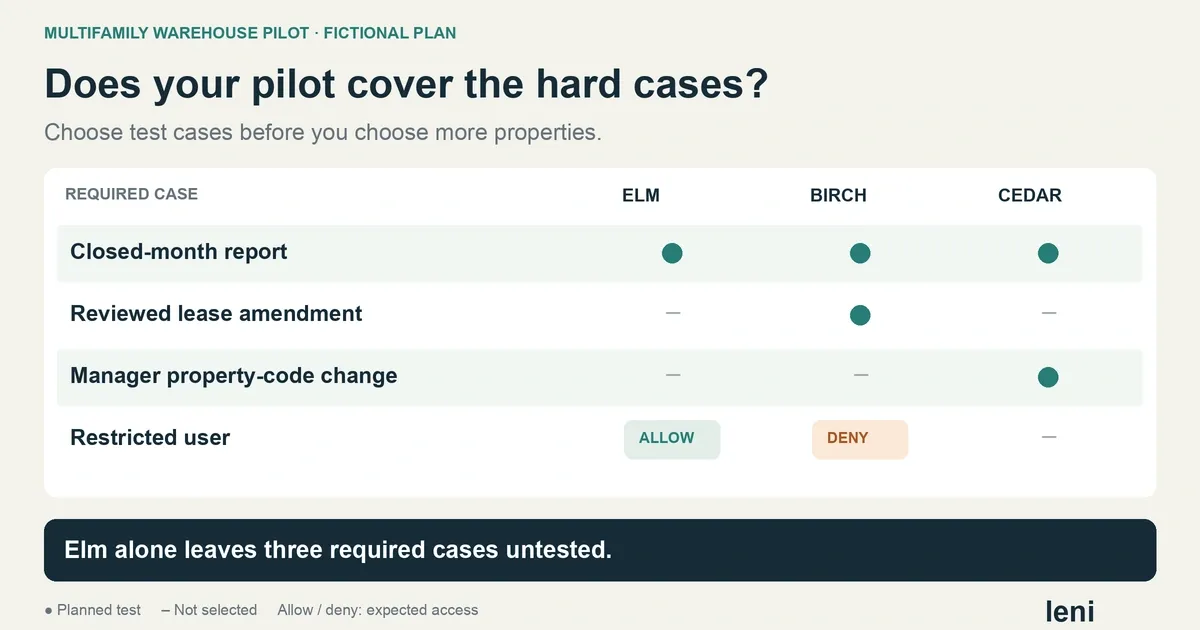
The following portfolio and test plan are fictional. Elm, Birch and Cedar are property labels, not customer examples. Each marked cell is a planned test; it is not a pass result.
| Required case | Elm | Birch | Cedar |
|---|---|---|---|
| Reproduce the approved closed-month report | Test | Test | Test |
| Link a reviewed lease amendment to its record | Not selected | Test | Not selected |
| Resolve old and new manager property codes | Not selected | Not selected | Test |
| Check a restricted user's allowed and denied access | Allowed case | Denied case | Not selected |
Testing only Elm would leave the amendment, manager-change and denied-access cases uncovered. Adding more clean properties like Elm would not close those gaps. A blank cell means the case is outside this test selection, not that the property has no risk.
This is a coverage plan, not a statistical sample or a guarantee about the full portfolio. If the rollout includes a source or condition absent from the matrix, record that limit and test it before relying on the pilot result for that scope.
Give every selected case an identifier. Record the input version, property, period, report filters, expected result, observed result, evidence location, reviewer and decision. Keep separate fields for the rule being tested and the records used to test it.
After a correction, repeat the affected case and any connected checks. Keep the original failure and the new result. A written explanation of a mismatch is evidence for a decision; it does not automatically satisfy the acceptance condition.
Set a review date, effort limit and decision owner before work starts. At that review, choose whether to accept the tested scope, hold for named fixes, extend the test for a specific gap or stop. A pilot should not continue indefinitely because its last condition remains unmet.
For example, Elm's report may pass while Birch's amendment link remains unresolved. Record that result as a limited success with an open case. It does not support a claim that document-linked reporting is ready across all three properties.
Keep pilot acceptance separate from permission to switch live reports. The reporting-cutover guide covers downstream connections and recovery. Use the requirements scorecard when comparing provider evidence.
Leni's real estate data warehouse service brings approved property records and document evidence into reporting and AI workflows. Use Leni's prebuilt warehouse or connect your existing warehouse. Bring one portfolio question and the cases it must handle; agree supported sources, history, definitions, access and review responsibilities before the pilot begins.

Co-founder & COO at Leni, writing about the systems, data, and AI behind better investment decisions.

Curious About AI?
Join the largest AI community for real estate online. Get bite-sized, real-world use case videos, plus practical tips and proven strategies from top industry experts on adopting AI effectively.
MEET LENI
AI SuperAgent Purpose Built for Investors and Operators.
Experience how professionals and teams in your domain are getting the edge using AI.