Universal Data Model for Real Estate AI | Leni
Universal Data Model for Real Estate AI | Leni
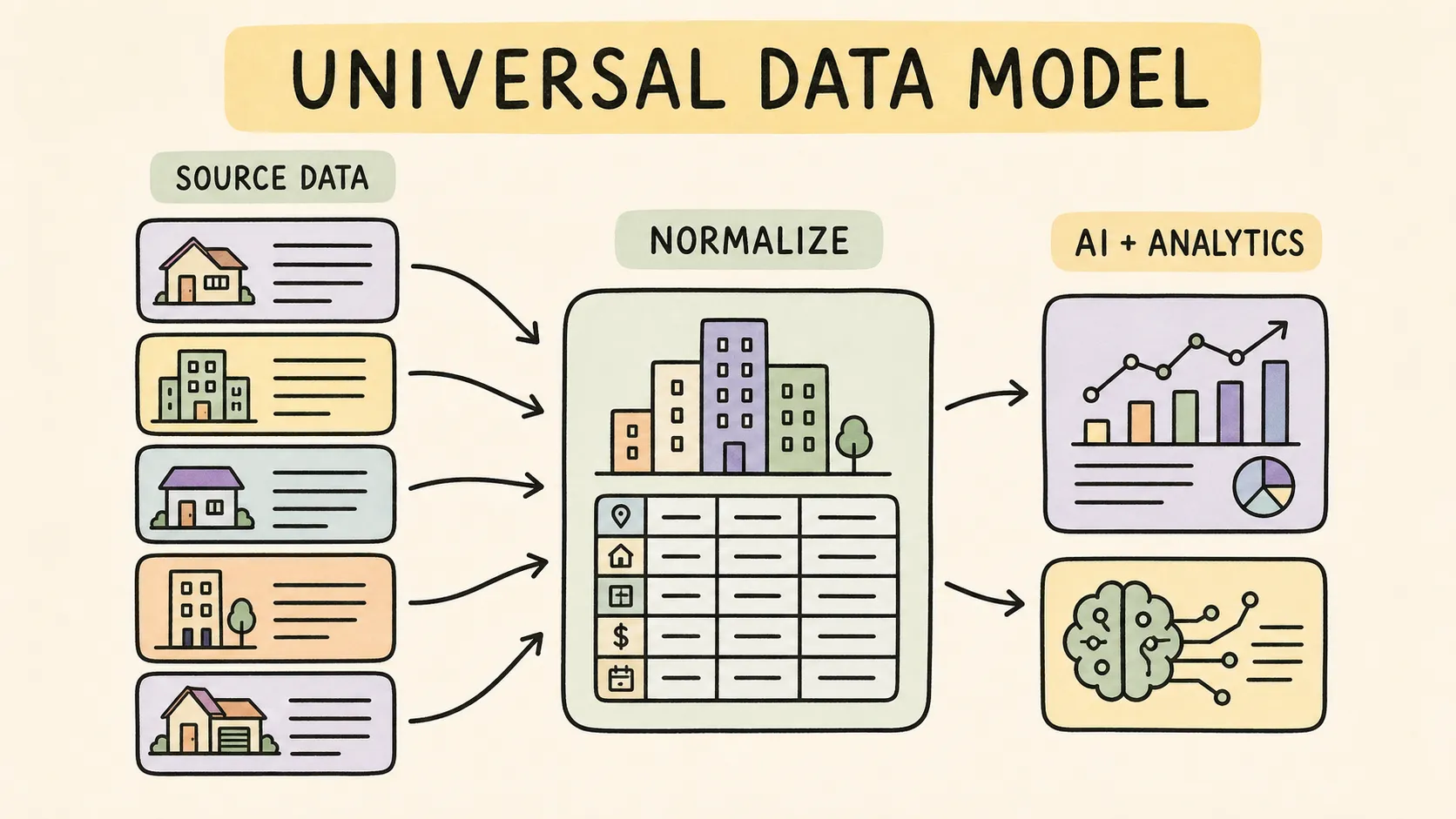
Most real-estate teams do not suffer from a data shortage. They have a consistency problem. A property, lease, or reporting period can look different from one system to another. Property-management systems, accounting platforms, and spreadsheets often describe the same information differently. Leni’s Universal Data Model gives those systems a shared structure, so developers and AI agents can work with approved data without learning every source from scratch.
One foundation for fragmented real-estate data
Real-estate teams work across property-management systems, accounting platforms, spreadsheets, documents, and internal databases. Each source can represent the same property, lease, period, or metric differently. Those differences create brittle integrations and make AI answers harder to trust.
Leni provides a governed data foundation between systems of record and the AI experiences built on top of them. Authorized source data is mapped into a consistent model so a developer does not need to teach every application every vendor-specific convention.
The goal is not to replace the systems that run the business. It is to give AI and software a stable way to understand the data those systems produce.
What the Universal Data Model does
Normalizes supported data
Leni maps supported, authorized source data into consistent business entities and relationships. The exact objects available depend on the customer’s connected systems, permissions, and implementation scope.
Preserves source context
Normalization should not erase provenance. Leni’s architecture is designed so the application can work with governed definitions while the underlying source systems remain authoritative.
Creates reusable semantics
A normalized field is only useful when the business meaning is clear. Leni’s semantic layer supplies governed definitions that help applications interpret metrics consistently rather than guessing what a column name means.
Supports multiple delivery paths
The same governed foundation can support server-to-server applications through Leni’s HTTP API and compatible AI assistants through Leni’s remote MCP runtime.
What a shared data model changes in practice
Suppose two property managers both report “occupancy,” but one sends a month-end snapshot and the other sends a monthly average. Putting those numbers into the same column does not make them comparable. You first need to agree on the definition, period and property set.
That is the job of the data model and your reporting rules. Leni gives an authorized application a consistent way to discover and query the data available to it; your team still needs to validate the mappings and definitions behind the comparison.
Here is a fictional mapping worksheet. It illustrates the checks we recommend, not vendor field names, a Leni API response or a guarantee that every connection exposes these fields.
Source input | Common reporting concept | Check before comparing |
|---|---|---|
Different property identifiers in separate exports | One agreed property identity | Confirm the identifiers refer to the same asset and reporting entity. |
Occupied-unit counts | Physical occupancy | Use the same date and unit denominator; distinguish a snapshot from an average. |
Ledger expense accounts | Operating-expense categories | Approve account mappings, accounting basis and exclusions before calculating NOI. |
Dates and currency codes | Reporting period and currency | Keep period boundaries and currency explicit. Do not silently mix currencies. |
For example, a fictional 100-unit property with 92 occupied units at month-end has 92% physical occupancy at that point in time. That result should not be labelled “monthly average occupancy” or “economic occupancy.” A shared model helps you use a consistent definition; it does not remove the need to choose the right one. See physical versus economic occupancy for the distinction.
Check coverage before you build the workflow
Start with one property, one closed reporting period and the question your application needs to answer. Ask which source is connected, what data is authorized, how recently it was refreshed, and which measures are actually available.
For Yardi data, our approach is customer-authorized ETL. The available data depends on the agreed export and implementation. Our Yardi integration guide explains the approach. For an Entrata workflow, start with our guide to using Entrata data with ChatGPT and Claude and confirm the data and permissions in scope for your account.
What to confirm | Why it matters |
|---|---|
Source, properties and permissions | A connected system does not imply access to every property or record. |
Available models, measures and dimensions | Build against what your authorized account exposes, not a guessed universal field list. |
Refresh timing and historical coverage | A missing period or delayed feed can change the interpretation of a result. |
Definitions and reconciliation | Compare a small sample with the source report before expanding the workflow. |
From a question in Claude or ChatGPT to a read-only query
An MCP-compatible host connects to Leni through delegated user sign-in and consent. Once connected, an application can use the documented discovery tools to find the data it is allowed to query.
Discover available models with
leni_list_data_models.Inspect the selected model with
leni_describe_data_modeland use the exact returned measure and dimension names.Query those members with
leni_query_portfolio_data. Leni applies the authorized organization and property scope. This is a bounded, read-only query, not arbitrary SQL.Review the result against the requested period, definitions and source evidence before turning it into a decision or report.
A useful starting prompt is:
Use Leni to discover the data available for this property. Check whether you can compare occupancy for the same reporting period. State the definition and period used, identify anything missing, and do not substitute an estimate for unavailable data.
The host decides when to call a tool, so name Leni explicitly when you want it used. If a required member is not available, the next step is to confirm coverage or adjust the question—not invent a field name or treat a missing value as zero.
For the current endpoint, permissions and query limits, use the MCP reference. For a server-side application without an interactive user sign-in, start with the HTTP API documentation; project keys belong on your server, not in a browser or MCP connector field.
What a Leni portfolio query returns
The discovery tools give your application the model names, measures, and dimensions it can use. A portfolio query then returns rows with those member names, a source label, the returned row count, and the requested limit.
The example below uses member names verified through one authorized Leni connection. The date and occupancy value are fictional. Your connection may expose different models, so list and describe the available model before using the request.
Call leni_query_portfolio_data with these arguments after confirming the members:
{
"measures": [
"faor_occupancy_rate.actual_occupancy_rate"
],
"timeDimensions": [
{
"dimension": "faor_occupancy_rate.faor_stats_date",
"granularity": "day",
"dateRange": [
"2026-09-30",
"2026-09-30"
]
}
],
"limit": 1
}
The tool's structured result has this shape:
{
"data": {
"source": "leni_semantic_layer",
"rows": [
{
"faor_occupancy_rate.faor_stats_date.day": "2026-09-30T00:00:00.000",
"faor_occupancy_rate.actual_occupancy_rate": "0.92",
"faor_occupancy_rate.faor_stats_date": "2026-09-30T00:00:00.000"
}
],
"rowCount": 1,
"limit": 1
}
}
In this illustration, the occupancy ratio "0.92" represents 92%. The response preserves the numeric string returned by the semantic query. Read the discovered member's definition and format before converting a value for display.
The date fields identify the daily snapshot. They do not establish when the source system last refreshed. Confirm feed freshness separately when it matters to the decision.
rowCount describes the returned rows. It does not prove that the entire portfolio or every matching record is present. When the row count reaches the requested limit, check whether the result may be incomplete. Query portfolio totals directly rather than adding a limited property breakdown.
This example is the MCP tool's structured result. For HTTP analysis requests, use the separate HTTP API contract. It describes the endpoints and analysis lifecycle for your server-side application.
From raw data to useful AI
A production AI workflow needs several layers:
Authorized data access: the customer controls which systems, organizations, properties, and records are in scope.
Universal Data Model: supported source data is normalized into consistent entities and relationships.
Semantic layer: governed definitions explain what the data means.
Context layer: relevant organizational and personal context helps the system understand how the firm works.
Intelligent runtime: Leni coordinates permitted data, context, analysis, and tools.
API or MCP delivery: developers and compatible assistants access the governed capabilities through the appropriate interface.
This separation makes the AI experience easier to evolve without rebuilding every source integration whenever an application or model changes.
What teams can build
With an approved implementation, teams can build experiences such as:
Portfolio and property analysis grounded in authorized data
Month-end reporting workflows
Variance and performance review
Research and memo generation with traceable inputs
Internal assistants that use consistent real-estate definitions
Custom applications that combine portfolio data, market research, and organizational context
Availability depends on the connected data, customer permissions, plan, and the specific Leni capabilities used.
Designed for governed access
Leni’s direct semantic-layer portfolio tools are read-only. Organization and property boundaries are enforced by Leni, and clients do not send raw SQL through the public MCP tools.
For server-to-server applications, developers use project API keys according to the public documentation. Compatible assistants use Leni OAuth so each user signs in, reviews the requested access, and works within the organization and property scope they are entitled to use.
A data foundation, not another system of record
Leni works alongside the property, accounting, document, and data systems a firm already relies on. The Universal Data Model is the contract that helps the AI layer understand those systems consistently. It does not change the ownership of the original data or create permission outside the customer’s approved scope.
Frequently asked questions
Why use Leni’s Universal Data Model instead of mapping every system ourselves?
Property and investment systems often describe the same business concept in different ways. We map supported data into one governed real-estate model so your team can use consistent entities, relationships, and definitions across applications and AI workflows. That reduces the amount of one-off source logic your developers have to maintain.
Will Leni replace our property-management system or data warehouse?
No. Your authorized source systems remain the systems of record, and your warehouse can continue to play its existing role. Leni adds a governed data and semantic layer that helps applications and AI use those sources consistently.
Can Leni combine data from more than one system?
Yes, when your organization has approved access to those sources and the relevant mappings are supported. The Universal Data Model is especially useful when you want one workflow to understand property, financial, market, document, or operational data that originated in different systems.
Can I use the same Leni data in ChatGPT, Claude and my own application?
Yes, through the supported interface for each workflow. MCP-compatible hosts use delegated Leni user consent. A server-side application uses the HTTP API with a project key. Those are different authentication flows, and access still depends on the account, permissions and available data.
Will every system provide the same fields?
No. We confirm the source data, implementation and authorized coverage with you. Your application should discover the available models and describe their members before querying. A shared model makes supported data easier to use consistently; it does not promise that every source contains the same information.
Does asking a question change our property-management records?
Leni's portfolio and semantic-query tools are read-only. They do not update property-management records. Context notes have separate write tools and permissions, and should be changed only when you explicitly ask.
What should we test first?
Choose one question you already know how to reconcile. For example, compare a property's occupancy figures for the same period, or review an authorized financial measure against a closed-month report. Agree on the expected definition, verify the result, then expand. Our NOI and occupancy guide shows why a consistent comparison matters.
Build on governed real-estate data
Explore the Leni developer documentation or talk to Leni about the systems, data scope, and AI workflow you want to support.

Leni
Purpose-built AI analyst for investment finance and real estate. Leni runs persistent workflows across underwriting, market research, memos, and reporting so teams can move faster with higher confidence.
Curious About AI?
Join the largest AI community for real estate online. Get bite-sized, real-world use case videos, plus practical tips and proven strategies from top industry experts on adopting AI effectively.
MEET LENI
AI SuperAgent Purpose Built for Investors and Operators.
Experience how professionals and teams in your domain are getting the edge using AI.
