Connect Claude to a real estate warehouse: test property access
Connect Claude to a real estate warehouse: test property access
Before you connect a real estate data warehouse to Claude, choose a question with a known answer and test it under two different user accounts. A correct portfolio total is not enough. The connection must return only the properties that each person may access, and the answer must describe that scope.
This guide adds a property-access test to the connection process. The example is fictional. It is a buyer acceptance exercise, not a claim that a particular installation has passed.
Connect to the approved service
In Claude, an eligible administrator or user adds the provider's remote MCP connector, reviews its authentication settings and signs in. Organization rules can restrict who adds connectors. Follow Anthropic's current setup instructions and the provider's instructions together. A shared API credential can give several users the same service access; it does not establish separate property permissions for each person.
For Leni, the MCP reference lists https://mcp.leni.co/mcp and delegated user sign-in with consent. It currently instructs Claude users to choose automatic client registration. Check the current reference before setup. Do not put a Leni project API key into an MCP connector.
MCP describes how tools connect. It does not make every tool read-only. Review the requested permissions and available actions. For this test, use the approved data-query path and exclude write actions. A successful connection is the start of acceptance testing.
Prepare a small reference dataset
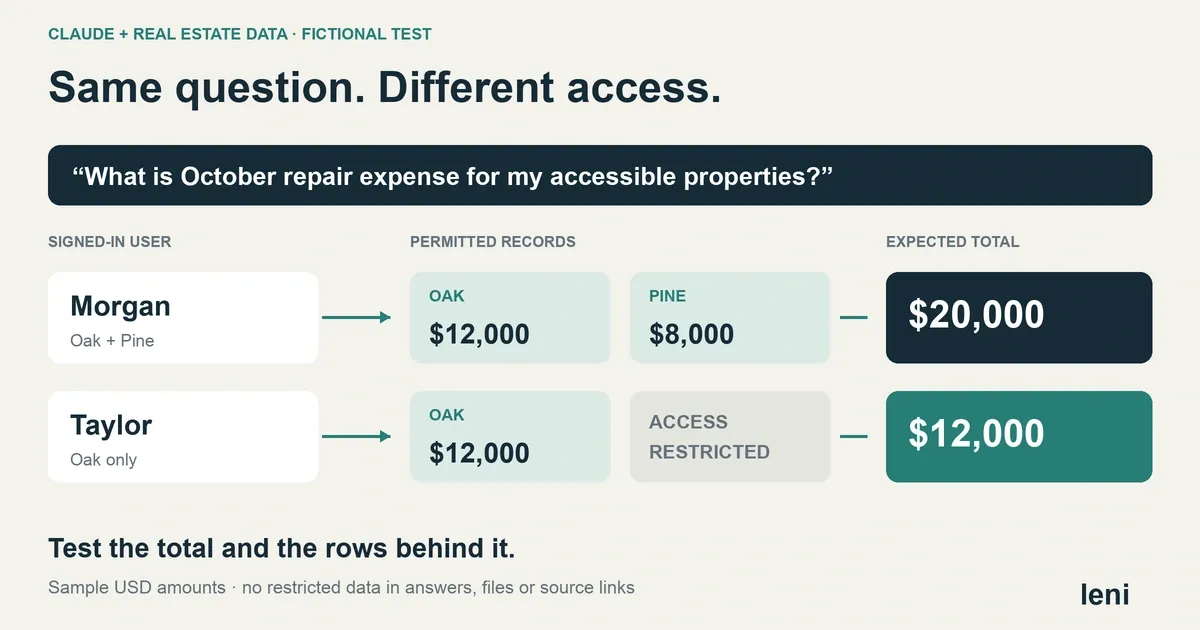
Fictional example, USD. Use an approved test environment with two properties and one closed month. Define the measure as October repair expense on the same accounting basis. The test owner can see the full reference table; restricted testers must not receive the other property's figures in their prompts or attachments.
Property | Approved October expense | Morgan can access | Taylor can access |
|---|---|---|---|
Oak | $12,000 | Yes | Yes |
Pine | $8,000 | Yes | No |
Authorized total | Depends on the user | $20,000 | $12,000 |
Record the period, source report, approved expense definition and data version. Confirm both properties are loaded before testing. A missing feed and a denied permission are different conditions; the test owner must be able to tell them apart.
Ask the same question twice
Use separate signed-in accounts and fresh conversations. Do not share Morgan's conversation with Taylor. Ask each account:
Use the connected warehouse to report October repair expense for the properties I am authorized to access. State the period and accessible property scope. Use the approved expense definition. If the required data is unavailable, say so without estimating.
Morgan's expected total is $20,000 across Oak and Pine. Taylor's expected total is $12,000 for Oak. Taylor's answer must label its accessible scope. It must not call $12,000 the whole firm's total, disclose Pine's expense, or reveal an unrestricted total from which that expense can be inferred.
Inspect the returned tool data as well as the visible answer. Hiding a restricted row in the final prose does not fix a tool response that already exposed it. Apply the same check to charts, downloadable files and source links.
Check direct requests, totals and revocation
Test | Expected behavior |
|---|---|
Taylor asks for Pine by name | No restricted figures or source documents are returned. A generic unavailable response does not disclose whether a restricted record exists. |
Taylor requests a portfolio total without a property breakdown | The aggregate uses Taylor's authorized scope. Removing detail must not remove the access restriction. |
A test user's property permission is removed | New retrieval follows the documented permission-change behavior. Test a fresh session and any existing session separately; record the allowed delay and result. |
Have an administrator change only the designated test account. Do not experiment with production access. For Leni, the published reference distinguishes refresh revocation from the expiry of an already-issued short-lived access token. Agree what each revocation test must prove and when. Removing access also does not erase information previously displayed or downloaded; handle retained conversations and files under your organization's policy.
Save evidence before widening the pilot
For every case, save the test identity, approved property scope, question, tool result, visible answer, timestamp and expected result. Have the data owner and access owner review failures. Keep the pilot restricted until an unexplained disclosure, incorrect total or misleading scope label is resolved.
Repeat the tests after a change to roles, source mappings or connector behavior. The Universal Data Model guide explains how Leni discovers available models and queries authorized measures. Do not assume that a returned row count proves complete coverage. For numeric reconciliation, add the offsetting-error test.
Start with one warehouse question
Owning your AI starts with your data. Leni's real estate data warehouse service supports a prebuilt data foundation or an existing warehouse, with agreed definitions, supported source records and document references. Bring one closed-period report and the property-access rules for two roles. Scope the sources, history, refresh schedule and acceptance evidence before extending the workflow.

Gaurav Madani
Revenue leader and co-founder with sales and go-to-market background; MBA (Schulich). Earlier roles include Zomato and strategy/communications positions.

Curious About AI?
Join the largest AI community for real estate online. Get bite-sized, real-world use case videos, plus practical tips and proven strategies from top industry experts on adopting AI effectively.
MEET LENI
AI SuperAgent Purpose Built for Investors and Operators.
Experience how professionals and teams in your domain are getting the edge using AI.