Real estate warehouse validation: test offsetting errors
Real estate warehouse validation: test offsetting errors
A real estate data warehouse validation checklist should test more than the portfolio total. Two property errors can cancel each other. A report can show the correct total while assigning money to the wrong asset.
Use the fictional example below to test that risk before approving a warehouse report. It compares monthly rent charges for three properties. The amounts are invented test data in USD, not operating benchmarks or a claim about a customer.
Freeze the comparison before you run it
Record the source export, warehouse load, reporting period, cutoff time and time zone. Use the same property scope, currency, charge definition and exclusions on both sides. Keep the source file and mapping version so another reviewer can repeat the test.
For this exercise, compare the approved monthly rent-charge amount for each property. These are charges, not payments received, and each amount uses the same period and accounting basis. The exact-match rule below is specific to this test. Your report owner must approve real production tolerances before seeing the results.
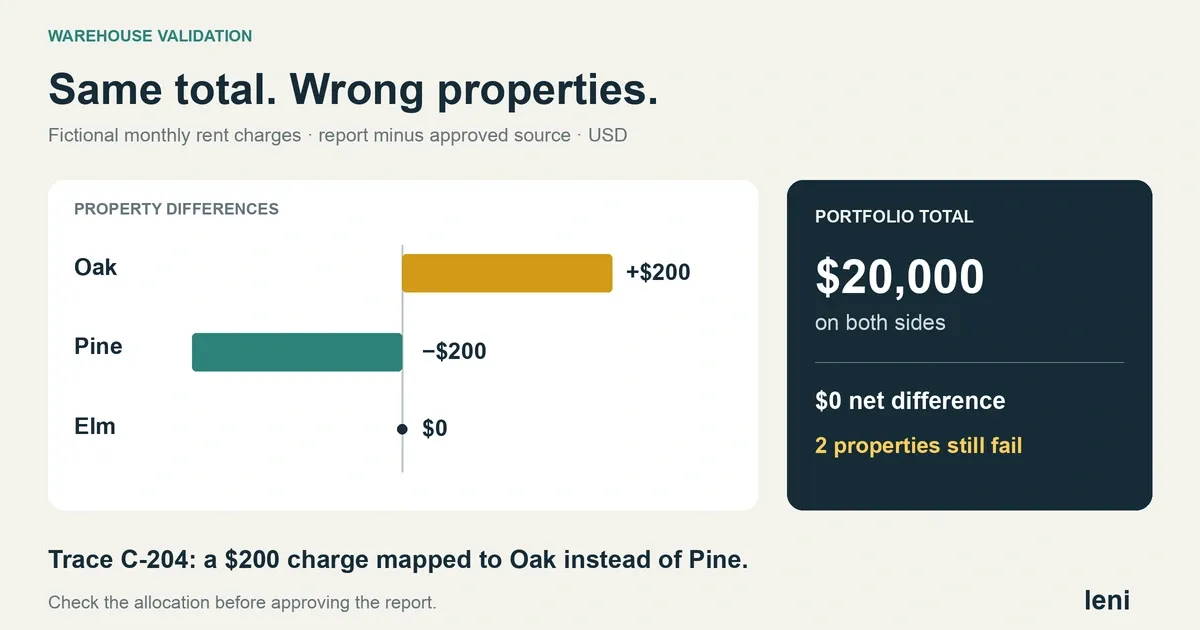
A matching total can hide two errors
Property | Approved source | Warehouse report | Difference: report minus source |
|---|---|---|---|
Oak | $5,000 | $5,200 | +$200 |
Pine | $7,000 | $6,800 | −$200 |
Elm | $8,000 | $8,000 | $0 |
Portfolio | $20,000 | $20,000 | $0 |
The portfolio comparison passes, but Oak and Pine fail. Do not approve the property report because the net difference is zero. The sum of the absolute property differences is $400. That is a validation signal, not $400 of lost rent: in this scenario, one $200 charge was assigned to the wrong property.
Baker Tilly's guidance on data transfers explains why testing must match the detail used in downstream reporting. A total-level comparison alone does not establish that the underlying balances reached the correct records.
Compare keys and amounts at the report's level of detail
First compare the expected property identifiers with those in the warehouse. Then compare each property's amount. For any difference, trace the source charge identifier through the mapping and into the report. Property names alone are not reliable join keys.
In this invented case, charge C-204 belongs to Pine in the approved export. The mapping assigns it to Oak. The charge amount itself remains $200, so both the row count and the portfolio total can remain unchanged. A property-level comparison exposes the problem.
Even matching property totals do not prove every charge is correct. Repeat the check at the detail needed for the intended output, such as a unit, lease or charge identifier. Check duplicate keys, missing expected records and unexpected records separately. A missing value must not become zero; use the states in our real estate data dictionary guide.
Keep a short exception and retest record
Record | Evidence to keep |
|---|---|
Exception | C-204 mapped to Oak instead of Pine; preserve both property differences and the source reference. |
Owner and correction | A named mapping owner corrects the property assignment after the business owner confirms the source. |
Retest | Use the same frozen input. Expect Oak $5,000, Pine $7,000 and Elm $8,000, with no missing or duplicate charge. |
Approval | Record the tested load, mapping version, report version, reviewer, decision and time. Keep the failed result beside the retest. |
Fix the layer that caused the defect. Here, the source is correct and the mapping is wrong, so changing the source ledger would create a new error. Do not hide the difference with a manual dashboard adjustment.
After the correction, run the same load again and confirm that C-204 appears once under Pine. Recheck the property report and any AI answer that uses it. An assistant asked for the three property amounts must return the corrected split, within the user's access scope, rather than treating the unchanged $20,000 total as proof of success.
Approve the tested output
Keep the report on hold until the owner resolves the failed checks or explicitly documents a permitted, limited use. A completed data load and an approved report are separate decisions. Our warehouse migration guide covers testing the reporting path when connections change.
Leni's real estate data warehouse service brings approved property records and document evidence into reporting and AI workflows. Your team approves definitions and exceptions. Bring one report, its source export and an example that should fail to the implementation discussion.

Gaurav Madani
Revenue leader and co-founder with sales and go-to-market background; MBA (Schulich). Earlier roles include Zomato and strategy/communications positions.

Curious About AI?
Join the largest AI community for real estate online. Get bite-sized, real-world use case videos, plus practical tips and proven strategies from top industry experts on adopting AI effectively.
MEET LENI
AI SuperAgent Purpose Built for Investors and Operators.
Experience how professionals and teams in your domain are getting the edge using AI.