Fri Nov 27 2026
Property management data integration: count an invoice once
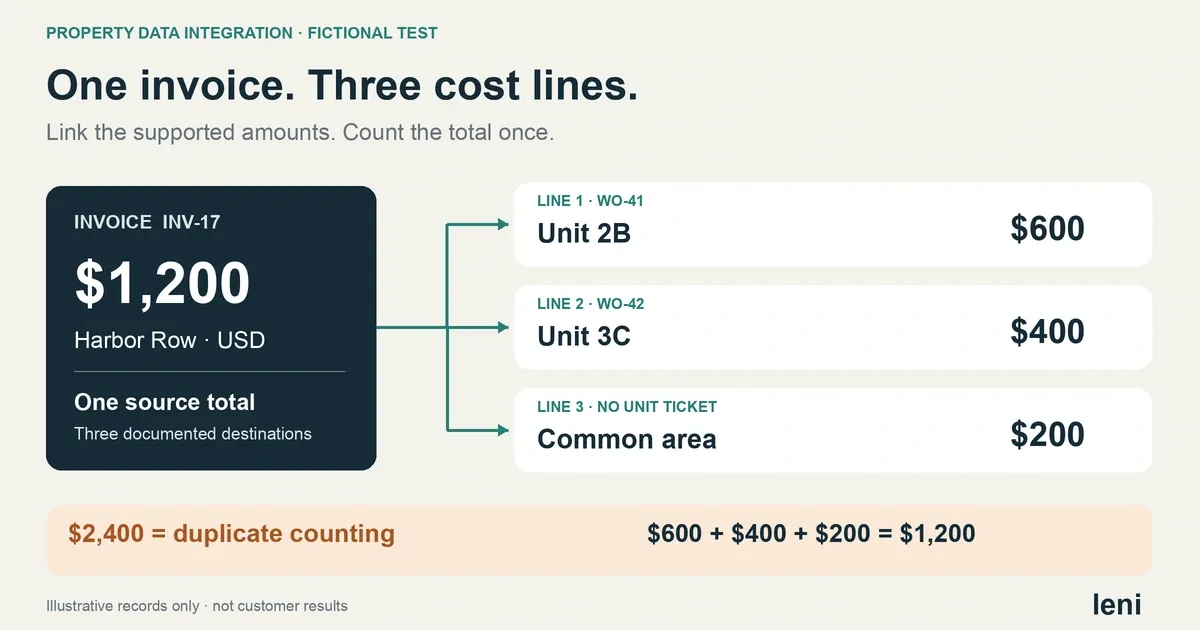
One vendor invoice can cover several work orders. If a property management data integration copies the full invoice amount onto every linked ticket, a report can overstate repair costs even though each source record is correct.
Before accepting the connection, ask the provider to demonstrate one invoice with several cost lines. Check the property total, the unit breakdown and the supporting document together.
The following example is fictional. At Harbor Row, invoice INV-17 contains three approved repair-cost lines. Assume the accounting reference for this test is $1,200 USD, with no additional tax, credit or adjustment. This is a test dataset, not a customer result or an accounting policy.
| Invoice line | Supported destination | Amount |
|---|---|---|
| Line 1: work order WO-41 | Unit 2B | $600 |
| Line 2: work order WO-42 | Unit 3C | $400 |
| Line 3: common-area repair | Property common area; no unit ticket | $200 |
| Invoice total | Harbor Row | $1,200 |
The two unit tickets account for $1,000. The remaining $200 has a documented common-area destination. A report that sums the $1,200 invoice header once for WO-41 and again for WO-42 returns $2,400. That is a join error, not another invoice.
Ask the implementation team to identify the level of detail in each input and output. An invoice header, an invoice line, a work order and a ledger posting are different records. A link between them does not make their amounts interchangeable.
Do not rely on invoice number alone across different vendors or systems. Confirm the source's identifier rules. If one line covers several jobs, require an approved allocation that sums to that line's amount. Do not divide it equally merely because two tickets appear nearby.
For a second test, remove the destination from line 3. The invoice still totals $1,200. The unit report should show $1,000 assigned and $200 unresolved, with an owner and the original reference. It must not silently report $1,000 as complete, put the $200 on a guessed unit or label it common-area work without evidence.
A scanned invoice can supply candidate line amounts and ticket references. Have an authorized reviewer check uncertain extraction against the original before approving a link. A similar date, vendor name or amount can suggest a match; it does not prove one. Our document-processing guide covers review of extracted fields.
| Test | Expected result for this example |
|---|---|
| Property expense | $1,200, counted once |
| Documented destinations | Unit 2B $600; unit 3C $400; common area $200 |
| Missing line-3 destination | $1,000 assigned plus $200 unresolved; total remains $1,200 |
| Load the same input again | No duplicate invoice, line or cost link; totals unchanged |
| Open supporting evidence | Authorized reviewer can inspect each line and its approved link |
Record the input version, report filters, expected result, observed result and reviewer. Compare at the detail needed for the decision. A correct property total alone does not prove the unit assignments; see our property-level validation example.
Keep work date, invoice date, accounting period and warehouse load time separate. The accounting owner must approve the reporting basis. Invoice arrival alone does not determine expense recognition, and a posted invoice does not prove payment. Test changes to a closed-period report separately using the late-posting example.
Test an assistant with both questions: “What was the property's repair cost?” and “How much is assigned to each unit?” In the incomplete-evidence case, the answer must disclose the unresolved $200. It must use the same approved data and access limits as the report.
Leni's real estate data warehouse service brings approved property records and document evidence into reporting and AI workflows. Use the prebuilt warehouse or connect your existing warehouse. Bring one invoice that covers several jobs, its source records and the expected breakdown to the scoping discussion.

Revenue leader and co-founder with sales and go-to-market background; MBA (Schulich). Earlier roles include Zomato and strategy/communications positions.

Curious About AI?
Join the largest AI community for real estate online. Get bite-sized, real-world use case videos, plus practical tips and proven strategies from top industry experts on adopting AI effectively.
MEET LENI
AI SuperAgent Purpose Built for Investors and Operators.
Experience how professionals and teams in your domain are getting the edge using AI.